
AWS costs rarely spike overnight.
They increase gradually — inside architecture decisions.
Most teams assume:
- traffic increased
- usage grew
- this is expected
In reality, cost growth is usually caused by structural inefficiencies.
Cost Growth Is an Architecture Problem
By the time the issue is visible:
- inefficient traffic patterns are already in place
- scaling behaviour is misaligned
- storage and logs have grown uncontrolled
Deleting resources is not optimisation.
Understanding where cost is created is.
The 5 AWS Cost Leak Patterns
Almost every increasing AWS bill maps to one of these:
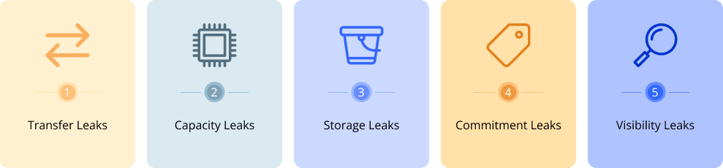
Transfer Leaks
- Cross-AZ traffic
- NAT Gateway processing
- Service-to-service chatter
- Overprovisioned compute
- Idle workloads
- High autoscaling baseline
- No lifecycle policies in Amazon S3
- Old snapshots and logs
Commitment Leaks
- Low Savings Plans utilisation
- Wrong assumptions
Visibility Leaks
- Untagged spend
- High telemetry ingestion (New Relic)
The Cost Diagnosis Flow
Most teams jump straight into optimisation. That’s the mistake.
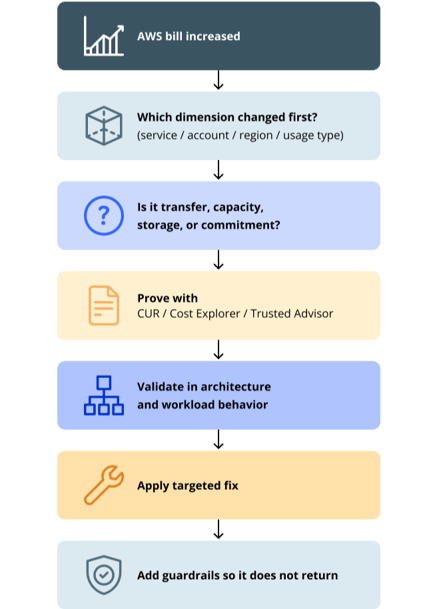
If you skip this process:
- you fix the wrong issue
- cost returns quickly
- engineering effort is wasted
The AWS Cost Leak Checklist
This is how engineering teams should actually think
A. Traffic
- Cross-AZ traffic increased?
- NAT Gateway cost rising?
B. Capacity
- Baseline capacity too high?
- Autoscaling aligned with demand?
C. Storage
- Lifecycle policies in place?
- Logs controlled?
D. Commitment
- High On-Demand usage?
- Savings Plans underutilised?
E. Visibility
- Cost owner assigned?
- Proper tagging in place
This checklist identifies the problem. It does not solve it — architecture changes do.
What Actually Changed Recently in AWS
AWS didn’t make cloud cheaper.
They made cost easier to understand and analyse.
Faster Cost Analysis
- Natural language queries in Cost Explorer
- Engineers can query cost directly
🔗 Reference: AWS Cost Explorer Natural Language Query (Apr 2026)
Better Visibility
- Scheduled cost reports
- Easier FinOps cadence
🔗 Reference: AWS Billing Dashboard Scheduled Reports (Apr 2026)
More Accurate Recommendations
- Improved NAT Gateway detection
- Better cleanup confidence
🔗 Reference: AWS Trusted Advisor NAT Gateway Improvements (Feb 2026)
Expanded Savings Opportunities
- More services included in Savings Plans
🔗 Reference: AWS Database Savings Plans Expansion (Mar 2026)
These improvements reduce analysis time. They do not fix architecture inefficiencies.
What Most Teams Still Miss
- Cost is treated as finance, not engineering
- Optimisation is reactive
- Fixes are temporary
- Architecture is rarely revisited
Final Thought
If your AWS bill is increasing and you can’t clearly explain why, the root cause is usually not a single service, but how workloads, traffic, and scaling decisions interact over time.
More on our approach to AWS cost optimisation in production environments.