
Most AI security discussions start with prompt injection, data leakage and guardrails.
Those risks matter.
But once an AI feature moves into production, security becomes a wider platform problem.
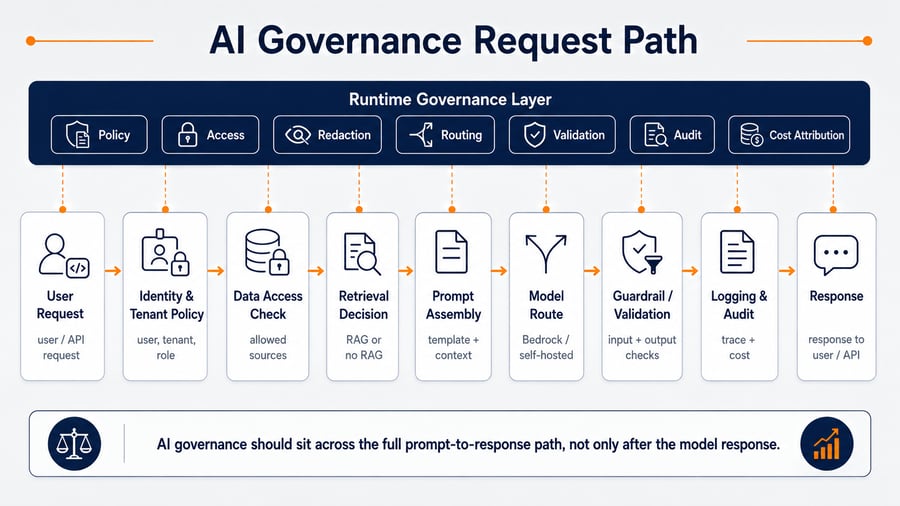
A production AI system does not only send a prompt to a model. It may retrieve customer data, assemble context, route requests across models, call tools, apply guardrails, log activity, attribute cost and return outputs into business workflows.
At that point, AI security is no longer only about stopping unsafe responses.
It is about controlling the full request path.
For teams building AI systems on AWS, this means answering practical engineering questions:
- Who is allowed to call each AI capability?
- Which tenant, customer or workflow does the request belong to?
- Which data sources can be retrieved?
- Which model route is allowed for this task?
- Which prompts and guardrails apply?
- What should be logged, redacted or retained?
- Which outputs require validation before they reach the user?
- Which actions should an AI agent never be allowed to perform directly?
This is where AI security and governance on AWS becomes a production architecture concern.
Not a policy document.
Not only a model setting.
Not a guardrail added at the end.
A secure AI platform needs governance built into the runtime path.
AWS frames generative AI security across governance, privacy, risk management, controls and resilience, and its security scoping model is based on how much ownership the organisation has over the model, data and application layer. The AWS Generative AI Security Scoping Matrix is useful because it helps teams classify what they own and which controls they are responsible for. The AWS Well-Architected Generative AI Lens also treats security, reliability, cost, observability and responsible AI as lifecycle concerns rather than one-off implementation tasks.
Why AI Governance Is Different from Normal Application Security
Traditional application security is built around relatively predictable execution paths.
A user calls an API. The API checks identity and permissions. The application executes code. The database returns data. Logs record what happened.
AI systems introduce a different pattern.
The behaviour of the system can be influenced by:
- user input
- system prompts
- retrieved documents
- conversation history
- metadata filters
- model selection
- tool access
- guardrail configuration
- output validation rules
This creates a new security boundary. The model is not the only risk.
The context around the model is the risk.
| Area | Traditional application | Production AI system |
|---|---|---|
| Input | Form fields, API payloads | User prompts, documents, embeddings, retrieved context |
| Execution | Deterministic code path | Model behaviour influenced by prompt and context |
| Data access | Query-level or API-level permissions | Retrieval-level and context-level permissions |
| Output | Structured response | Generated response that may need validation |
| Audit | API logs and database logs | Prompt version, retrieved document IDs, model route, guardrail result, output status |
| Abuse pattern | API misuse, injection, privilege escalation | Prompt injection, data exfiltration, tool misuse, unsafe generation, over-permissive agents |
This is why production AI governance needs to be designed as part of the platform architecture.
A secure AWS AI platform should not let every product team decide model access, prompt handling, retrieval permissions, logging, fallback behaviour and guardrails independently.
Those controls need to become shared platform capabilities.
The Production AI Security Problem
A prototype AI feature often starts like this:
Application
→ Prompt
→ Model
→ Response
A production AI feature usually looks more like this:
User request
→ Identity and tenant context
→ Capability authorisation
→ Data access policy
→ Retrieval decision
→ Document filtering
→ Prompt assembly
→ Prompt redaction
→ Model route selection
→ Guardrail application
→ Inference
→ Response validation
→ Audit logging
→ Cost attribution
→ Product response
Every step is a possible control point. Every missing control becomes a production risk.
The most common mistake is to treat AI security as a model-layer issue only.
In practice, many production failures happen outside the model:
- a user retrieves documents they should not see
- a low-risk workflow accidentally uses a high-risk model route
- a prompt includes sensitive data that should have been redacted
- a guardrail is applied inconsistently across services
- an agent has access to tools that are too broad
- logs store full prompts and responses without retention controls
- teams cannot explain which prompt, model, guardrail or retrieved documents produced a response
This is not only a security issue. It is also an operational governance issue.
1. Start by Classifying the AI Workload
Before designing controls, teams need to understand what they actually own.
The security model changes depending on whether the organisation is using:
- a third-party AI-enabled SaaS tool
- a pre-trained foundation model through Amazon Bedrock
- a fine-tuned model
- a self-hosted open-weight model
- an agentic workflow with tool access
- a custom model trained on proprietary data
The AWS Generative AI Security Scoping Matrix separates use cases based on the level of ownership over the model and data, from lower-ownership usage of external AI services to higher-ownership custom or self-trained models.
For SaaS, fintech, healthcare, AI-native and mid-market engineering teams building on AWS, the most common production patterns are usually:
| Pattern | Typical example | Main governance concern |
|---|---|---|
| Amazon Bedrock with pre-trained model | Support assistant, summarisation, internal knowledge assistant | Access control, prompt governance, guardrails, logging |
| RAG on AWS | Customer knowledge search, internal policy assistant, finance or healthcare document Q&A | Permission-aware retrieval, document filtering, citation quality |
| Fine-tuned or customised model | Domain-specific classification, specialist summarisation | Training data governance, model versioning, evaluation |
| Self-hosted LLM on Kubernetes | Cost-sensitive or latency-sensitive workloads | Runtime isolation, GPU access, scaling, model lifecycle |
| Agentic workflow | AI assistant calling APIs, creating tickets, querying systems | Tool permissions, approval gates, action logging |
A governance model that works for a simple summarisation feature may not be enough for a RAG workflow that retrieves customer records.
A governance model that works for RAG may not be enough for an agent that can call business systems.
The first security decision is therefore not:
Which model are we using?
It is:
What level of control does this AI workload need?
2. Put Model Access Behind a Controlled Runtime Layer
One of the fastest ways AI security becomes fragmented is direct model access from multiple services.
This often starts innocently.
One team calls Amazon Bedrock from a backend service. Another team builds a RAG assistant. Another adds a summarisation feature. Another runs a self-hosted model on Kubernetes.
After a few months, the platform has several independent model access paths.
Each path may have its own:
- IAM role
- prompt format
- logging behaviour
- retry logic
- model selection
- guardrail configuration
- token limit
- error handling
- cost attribution
That is difficult to govern.
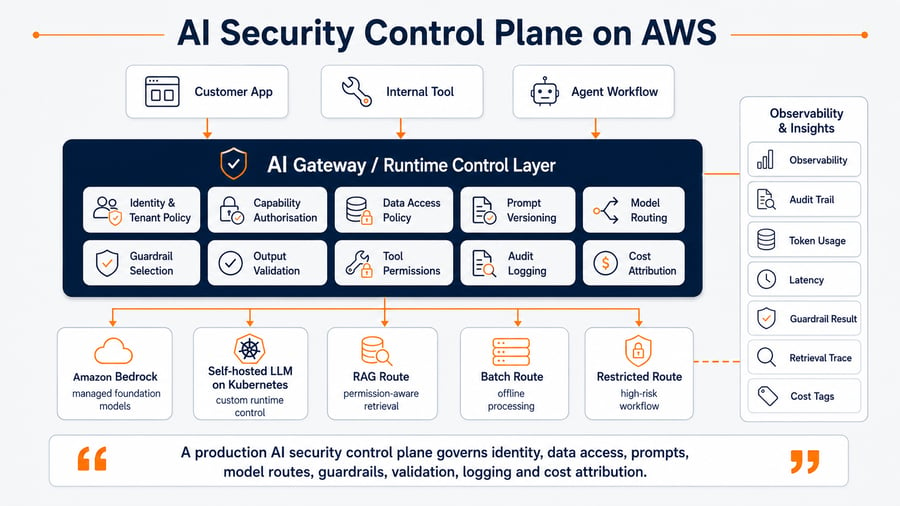
A stronger pattern is to place model access behind an AI gateway or inference control layer.
Product services
→ AI gateway / inference control layer
→ Policy engine
→ Retrieval and prompt assembly
→ Model route
→ Guardrails and validation
→ Observability and audit trail
This layer does not need to be heavy at the start.
But it should create one controlled interface for production AI access.
The AI gateway should decide:
- whether the user can use the AI capability
- whether retrieval is allowed
- which data sources can be queried
- which prompt template applies
- which model route is allowed
- which guardrail must be used
- whether streaming is allowed
- what should be logged
- what should be redacted
- what cost centre, tenant or product feature owns the request
Amazon Bedrock supports IAM-based control, including service-specific actions, resources and condition keys for inference, guardrails, inference profiles and prompt routers. These controls are important, but they should be part of a wider runtime governance pattern rather than the only layer of control. See the AWS documentation for Amazon Bedrock actions, resources and condition keys.
Illustrative IAM Policy Pattern
This is not a copy-paste policy. It shows the kind of restriction pattern teams should think about.
{
  "Version": "2012-10-17",
  "Statement": [
    {
      "Sid": "InvokeApprovedBedrockModelWithGuardrail",
      "Effect": "Allow",
      "Action": [
        "bedrock:InvokeModel",
        "bedrock:InvokeModelWithResponseStream"
      ],
      "Resource": [
        "arn:aws:bedrock:eu-west-2::foundation-model/example-model-id"
      ],
      "Condition": {
        "StringEquals": {
          "bedrock:GuardrailIdentifier": "arn:aws:bedrock:eu-west-2:123456789012:guardrail/example-guardrail-id"
        }
      }
    }
  ]
}
The production version should be tied to your AWS account structure, model selection, environment strategy, IAM roles, logging requirements and guardrail design.
The wider principle is simple:
Product services should not have unlimited model access.
They should have controlled access to approved AI capabilities.
3. Secure RAG Before the Prompt Is Built
RAG security is often misunderstood.
Teams focus on whether the final answer is safe.
But the more important question is:
Was the model allowed to see the retrieved context in the first place?
A RAG system can leak data even if the model behaves correctly.
If retrieval returns the wrong documents, the model may expose information that the user should never have accessed.
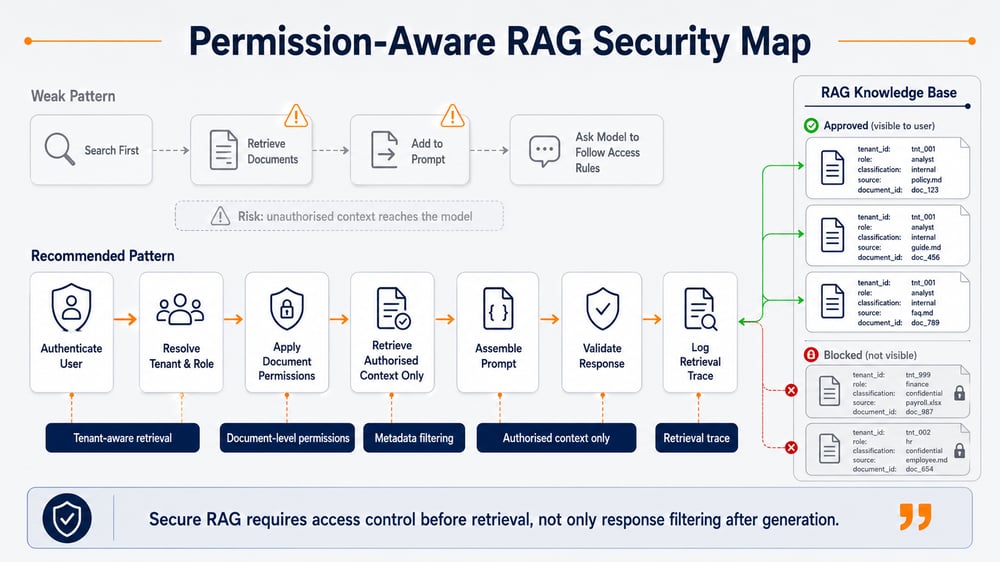
This is why secure RAG design needs access control before prompt assembly.
AWS Prescriptive Guidance highlights that RAG workloads can face risks such as data exfiltration from RAG data sources, indirect prompt injection through malicious documents, unauthorised access through weak controls and lack of provenance for auditability. It recommends defence-in-depth across ingestion, storage, retrieval and inference. See AWS guidance on secure access to data and systems for generative AI agents and RAG.
Secure RAG Control Points
| Layer | Control | What it prevents |
|---|---|---|
| Ingestion | Classify documents before indexing | Sensitive data entering the index without controls |
| Chunking | Keep document, tenant and permission metadata attached | Context losing its access boundary |
| Embeddings | Version embedding jobs and index updates | Stale or inconsistent retrieval |
| Retrieval | Apply tenant, role and document-level filters | Cross-tenant or unauthorised context exposure |
| Prompt assembly | Include only authorised chunks | Sensitive content entering the model path |
| Response | Validate grounding and citations | Unsupported or misleading answers |
| Audit | Log document IDs and retrieval scores | Impossible investigations after incidents |
The weakest pattern is this:
Search first
→ Retrieve documents
→ Add to prompt
→ Ask model to follow access rules
The stronger pattern is this:
Authenticate user
→ Resolve tenant and role
→ Apply document-level permissions
→ Retrieve authorised context only
→ Assemble prompt
→ Apply guardrails and validation
→ Log retrieval trace
The prompt should never be the first place where access control appears.
If a user is not allowed to see a document, that document should not be retrieved into the model context.
4. Treat Prompts as Governed Production Artifacts
In many teams, prompts start as text inside application code.
That works for early development.
It does not work well for production governance.
In production, prompts should be treated more like versioned configuration or policy-controlled application artifacts.
A production prompt should have:
- a version
- an owner
- an approval path
- a target workflow
- a model compatibility note
- allowed data classes
- output format requirements
- evaluation test coverage
- rollback capability
- change history
Prompt changes can affect security.
A small prompt edit may change whether the model:
- reveals internal instructions
- includes sensitive data
- refuses unsafe requests
- follows citation rules
- calls tools
- uses retrieved context correctly
- generates structured output reliably
That means prompt changes should not be invisible.
A practical prompt governance model separates:
System instruction
→ Policy instruction
→ Developer instruction
→ Workflow instruction
→ Retrieved context
→ User input
→ Output schema| Prompt component | Governance requirement |
|---|---|
| System instruction | Restricted editing, version control, review |
| Policy instruction | Security-owned or platform-owned |
| Workflow instruction | Product-owned but reviewed |
| Retrieved context | Permission-filtered and traceable |
| User input | Sanitised and monitored |
| Output schema | Validated before use |
| Tool instruction | Least-privilege and approval-aware |
This is especially important when AI outputs feed downstream systems.
If a generated answer is only displayed to a user, validation may be light.
If a generated output updates a ticket, triggers a workflow, changes a record or calls an API, prompt governance needs to be much stricter.
5. Use Guardrails, But Do Not Treat Them as the Whole Governance Model
Amazon Bedrock Guardrails can provide configurable safeguards across foundation models. AWS documents support for content filters, denied topics, word filters, sensitive information filters, contextual grounding checks and Automated Reasoning checks.
That is useful.
But guardrails are not the entire governance model.
They are one control layer inside the runtime path.
A guardrail can help detect or block certain unsafe inputs or outputs.
It does not replace:
- identity and access control
- tenant isolation
- secure retrieval
- prompt versioning
- model allowlists
- audit logging
- tool-level permissions
- human approval for high-risk actions
- cost and usage governance
What Guardrails Can and Cannot Solve
| Control | Helps with | Does not replace |
|---|---|---|
| Content filters | Harmful or unsafe content categories | Data access control |
| Denied topics | Blocking disallowed topics | Workflow-level authorisation |
| Sensitive information filters | Detecting or masking PII patterns | Full privacy architecture |
| Contextual grounding | Checking whether output is grounded in reference content | Retrieval quality and permissions |
| Automated Reasoning checks | Validating responses against logical rules | End-to-end application validation |
| Custom blocked words | Domain-specific restrictions | Tenant-aware policy enforcement |
A better model is defence in depth.
Identity control
→ Data access control
→ Prompt control
→ Model route control
→ Guardrail control
→ Output validation
→ Audit logging
Guardrails are important.
But the platform should not depend on guardrails alone.
6. Control Model Routing by Risk, Not Only by Cost or Latency
Model routing is often introduced for cost optimisation.
Simple tasks can use cheaper models. Complex tasks can use more capable models. Latency-sensitive workflows can use faster routes.
That is useful, but incomplete.
In production, model routing should also consider security and governance.
A customer-facing workflow may need stricter guardrails than an internal summarisation task.
A regulated workflow may need a model route that keeps data within a specific AWS region or account structure.
A high-risk task may require human review before the response is used.
A low-risk internal draft may tolerate more flexible behaviour.
| Workflow | Routing decision | Governance requirement |
|---|---|---|
| Internal summarisation | Lower-cost model route | Basic logging and prompt versioning |
| Customer support assistant | Approved model with guardrail | PII masking, response validation, audit trail |
| Regulated document Q&A | Restricted model route | Permission-aware RAG, citation checks, retention policy |
| Finance or healthcare workflow | High-control route | Stronger validation, human review, strict logging |
| Agentic action workflow | Tool broker route | Action allowlist, approval gates, transaction limits |
This is why model routing should be part of the governance layer.
The platform should know which route is allowed for each use case.
Not every workflow should be able to call every model.
Not every model should be able to receive every data class.
Not every response should be treated as equally safe.
Amazon Bedrock also supports inference profiles, including application inference profiles that can help teams track costs and model usage by application-level dimensions. This is useful when governance, usage visibility and cost attribution need to be handled together.
7. Design Logging Without Creating a New Data Risk
AI teams need traceability.
Security teams need auditability.
Engineering teams need observability.
But logging AI systems can create a new data exposure problem if prompts, retrieved documents and responses are stored without care.
Amazon Bedrock supports model invocation logging using CloudWatch Logs and Amazon S3. AWS also provides monitoring across model invocations, knowledge bases, guardrails, agents, runtime metrics, EventBridge and CloudTrail through the Amazon Bedrock monitoring capabilities.
The question is not simply whether to enable logging.
The question is what to log, where to log it, how long to retain it and what to redact.
Minimum Useful AI Audit Record
A production AI request should usually produce a structured audit event containing:
- request ID
- timestamp
- user ID or service identity
- tenant ID
- product feature
- workflow type
- prompt template version
- model route
- guardrail ID and result
- retrieval query ID
- retrieved document IDs
- validation result
- input token count
- output token count
- latency
- retry count
- fallback path
- cost attribution tag
- final response status
For many workloads, this is more useful than storing the full prompt and full response.
Full prompt and response logging may be needed for debugging, investigation or regulated workflows, but it should be controlled with:
- redaction
- encryption
- restricted access
- retention limits
- environment separation
- clear incident review process
Logging Decision Table
| Log item | Usually useful | Risk |
|---|---|---|
| Request ID | Yes | Low |
| Tenant ID | Yes | Medium |
| Prompt version | Yes | Low |
| Model route | Yes | Low |
| Guardrail result | Yes | Low |
| Retrieved document IDs | Yes | Medium |
| Full prompt | Sometimes | High |
| Full response | Sometimes | High |
| Retrieved document text | Rarely | Very high |
| User feedback | Yes | Medium |
The goal is to make AI behaviour explainable without turning logs into a second copy of sensitive business data.
For cost and usage analysis, Amazon Bedrock also supports per-request metadata tagging, which can help teams attach key-value metadata to inference calls and analyse usage by team, application, environment or experiment.
8. Secure AI Agents with Tool Boundaries
Agentic workflows introduce another layer of risk.
A chatbot that answers questions is one thing.
An AI agent that can call APIs, query systems, create tickets, change records, trigger workflows or interact with cloud resources is different.
The risk is not only what the model says.
The risk is what the model can do.
The OWASP Top 10 for Large Language Model Applications highlights risks such as prompt injection, sensitive information disclosure, insecure plugin design and excessive agency. Those risks become more serious when the AI system can act through tools or APIs.
A secure agent architecture should avoid giving the model direct access to powerful credentials or broad APIs.
A better pattern is:
Model suggests action
→ Tool broker evaluates request
→ Policy engine checks permissions
→ Human approval if required
→ Tool executes with scoped credentials
→ Result is logged
→ Response is returned
Agent Governance Controls
| Control | Purpose |
|---|---|
| Tool allowlist | Limits what the agent can call |
| Scoped credentials | Prevents broad system access |
| Parameter validation | Blocks unsafe or malformed tool calls |
| Human approval | Adds control for high-risk actions |
| Dry-run mode | Lets teams test suggested actions safely |
| Transaction limits | Prevents unbounded changes |
| Full action logging | Supports audit and investigation |
| Rollback plan | Reduces operational impact |
The agent should not be the authority.
The platform should be the authority.
The model can propose.
The control plane decides.
9. Build Governance into the AWS Architecture
A practical AWS architecture for AI security and governance may include the following layers.
Users / product services
→ API Gateway, ALB or service mesh entry point
→ Authentication and tenant resolution
→ AI gateway / inference control layer
→ Policy engine
→ Secure retrieval layer
→ Prompt assembly layer
→ Model route
→ Guardrails and validation
→ Observability, audit logs and cost attribution
→ Product response
Inside the policy engine, the platform should usually define:
- capability policy
- tenant policy
- data access policy
- model route policy
- logging policy
Inside the secure retrieval layer, the platform should usually enforce:
- metadata filtering
- tenant filtering
- document permissions
- ingestion validation
Inside the prompt assembly layer, the platform should usually manage:
- prompt versioning
- context limits
- redaction
- output schema selection
The model route may include:
- Amazon Bedrock
- self-hosted model on Kubernetes
- restricted route
- batch route
This architecture can be implemented in different ways depending on maturity.
For a smaller team, the AI gateway may start as a shared service inside the application platform.
For a scale-up, it may become a dedicated platform component with policy-as-code, centralised logging and standard integration patterns.
For a regulated environment, it may need stronger separation across AWS accounts, environments, data classes and tenant boundaries.
The important point is not the exact implementation.
The important point is ownership.
AI governance needs a clear owner inside the platform.
If no team owns the runtime control layer, governance will spread across product code, prompts, IAM policies, notebooks, vector stores and dashboards.
That does not scale.
10. Production Readiness Checklist for AI Security on AWS
Before scaling an AI system in production, engineering teams should be able to answer these questions.
| Area | Readiness question |
|---|---|
| Ownership | Who owns the AI runtime governance layer? |
| Identity | Can every request be tied to a user, tenant, service or workflow? |
| Authorisation | Are AI capabilities authorised before model invocation? |
| Model access | Can product services call models directly, or only through approved paths? |
| RAG security | Is retrieval permission-aware before context enters the prompt? |
| Data protection | Is sensitive data redacted, masked or blocked where required? |
| Prompt governance | Are prompts versioned, reviewed and traceable? |
| Guardrails | Are guardrails applied consistently across workflows? |
| Model routing | Are model routes selected by task, sensitivity, latency and cost? |
| Logging | Is audit data useful without storing unnecessary sensitive content? |
| Monitoring | Can teams see latency, errors, token usage, throttling and guardrail results? |
| Agents | Are tool calls mediated through policy and approval controls? |
| Compliance | Can the team explain how a response was produced? |
| Cost governance | Are token usage and model routes attributed by tenant, feature and workflow? |
| Incident response | Can a risky prompt, model route or retrieval source be disabled quickly? |
If many answers are unclear, the AI feature may work, but the platform is not yet ready for controlled production use.
Common Failure Patterns
1. "We use Bedrock, so security is handled"
Amazon Bedrock reduces the operational burden of model hosting.
It does not remove the need to design application-level controls around identity, retrieval, prompts, logging, validation and governance.
2. "We added guardrails, so governance is covered"
Guardrails help with specific classes of unsafe input and output.
They do not replace access control, secure retrieval, prompt governance, audit design or agent permissions.
3. "The model should not reveal sensitive data because the prompt says so"
Prompts are not access control.
Sensitive or unauthorised data should not enter the model context in the first place.
4. "We log everything for debugging"
Full prompt and response logs may help debugging, but they can also create a sensitive data store.
AI observability should be designed with redaction, retention and access controls.
5. "Each team can choose its own model route"
That may work during experimentation.
In production, model access needs shared rules around security, cost, latency, data sensitivity and compliance.
FAQ: AI Security and Governance on AWS
What is AI governance on AWS?
AI governance on AWS is the set of controls used to manage how AI systems access data, call models, apply prompts, use guardrails, generate outputs, log activity and operate in production. For LLM systems, governance should sit across the request path, not only at the model endpoint.
Is Amazon Bedrock secure enough for production AI workloads?
Amazon Bedrock provides managed access to foundation models and integrates with AWS controls such as IAM, CloudWatch, CloudTrail, logging and guardrails. But production security also depends on how the application controls identity, retrieval, prompt handling, model routing, validation, logging and tenant boundaries.
Are Amazon Bedrock Guardrails enough for AI governance?
No. Bedrock Guardrails are an important runtime control, but they are not the full governance model. Teams still need access control, secure RAG design, prompt versioning, audit logging, model allowlists, tool permissions and incident response processes.
How do you secure RAG applications on AWS?
Secure RAG starts before retrieval. Teams should classify documents, preserve tenant and permission metadata, apply access filters before prompt assembly, validate retrieved context, monitor document ingestion and log which sources influenced each answer.
What should be logged in a production LLM system?
A useful AI audit event should include request ID, tenant, workflow, prompt version, model route, guardrail result, retrieval document IDs, validation status, token usage, latency, retry behaviour and cost attribution. Full prompts and responses should be logged only when necessary and protected with redaction, encryption, access controls and retention limits.
Where Bion Helps
AI security on AWS is not a single configuration choice.
It is a platform design problem.
A working AI prototype may prove the product idea, but production requires stronger controls around model access, RAG permissions, prompt governance, guardrails, observability, audit logging, cost attribution and operational ownership.
Bion helps teams design and implement production-ready AI platforms on AWS, including secure LLM deployment, Amazon Bedrock integration, RAG architecture, AI platform operations, Kubernetes-based inference workloads, observability and governance controls.
For teams moving beyond prototype stage, the key question is not only:
Can this AI feature produce useful output?
It is:
Can we operate this AI capability securely, reliably and transparently in production?
If your AI product is starting to face security, governance, retrieval, observability or compliance challenges, Bion can help you review the architecture and define the controls needed before those risks scale further.
Book a technical strategy call to review your AWS AI security and governance architecture.