
Most AI architectures start with a simple model call.
A product service sends a request to a model, receives a response, and the first version works well enough for a prototype.
At this stage, the environment is usually easy to manage because there is one team, one AI use case, one model provider, limited traffic, and informal governance.
The architecture starts to change when AI becomes part of the product platform.
A few months later, the same organisation may have:
- a support assistant
- an internal knowledge assistant
- document summarisation
- AI search
- analytics workflows
- code assistance
- automated classification
- customer-facing chat experiences
Each feature may use a different model, a different prompt structure, a different retrieval path, and a different set of security requirements.
At that point, model access is no longer just an application detail.
It becomes a platform capability.
That is where an AI gateway becomes important.
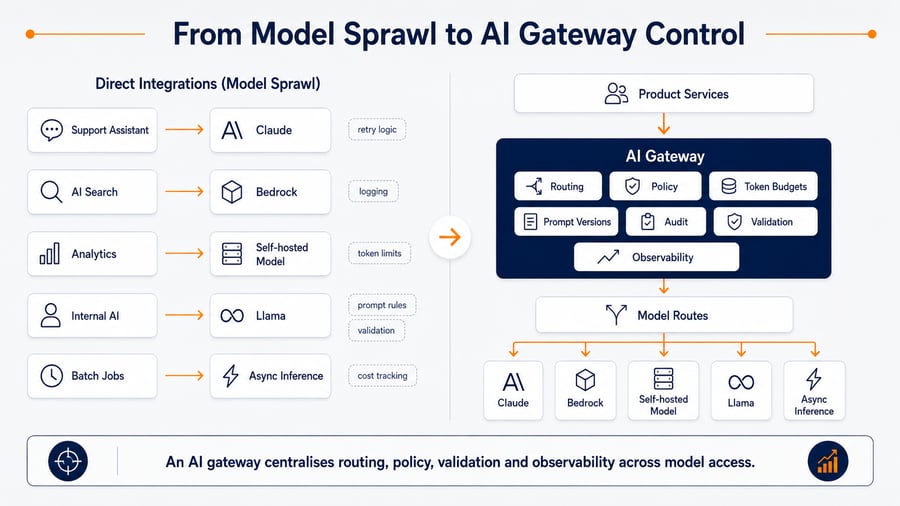
An AI gateway is not the model. It is not simply a proxy. It is the runtime control layer that decides how applications access models, which policies apply, how cost is controlled, what gets logged, and how inference behaviour is observed in production.
1. The Problem Is Not More Models
Most AI platform issues do not start because a team uses too many models.
They start because each AI feature builds its own access pattern.
A simple early-stage setup may look like this:
Support assistant

→ Claude
After several teams start building AI features, the environment may look more like this:
Support assistant → Claude

AI search → Amazon Bedrock

Analytics assistant → Self-hosted model

Internal knowledge bot → Llama

Batch summarisation → Async inference
This is not automatically a bad thing.
Different workloads should use different model paths. A fast classification request should not always use the same model as a complex reasoning workflow. A sensitive financial workflow may need stricter controls than an internal productivity feature.
The problem is that every team often implements its own version of:
- retry logic
- timeout behaviour
- model selection
- prompt management
- token limits
- logging
- redaction
- validation
- fallback handling
- cost tracking
- access control
This creates duplicated platform logic inside application services.
Over time, the result is not flexibility. It is fragmentation.
2. Introducing the AI Gateway
An AI gateway sits between product services and model providers.
Its role is not to run the model.
Its role is to control inference.
A simplified architecture looks like this:
Product services

→ AI gateway / inference control layer

→ Model providers
In production, this layer becomes the controlled entry point for AI workloads.
It can answer questions such as:
- Which model should this workflow use?
- Is this tenant allowed to access this data?
- How many tokens can this request consume?
- Which prompt version should be used?
- Should this request use retrieval?
- Should the response be validated before returning?
- Should the request fall back to another model?
- How should cost be attributed?
- What should be logged for audit and debugging?
This is why an AI gateway should be treated as part of platform architecture, not as a helper service inside one application.
3. What the AI Gateway Actually Controls
A production AI gateway usually controls five areas.
| Control area | What it manages | Why it matters |
|---|---|---|
| Model routing | Which model or provider handles the request | Prevents every service from hard-coding model access |
| Policy enforcement | Tenant, user, workflow and data access rules | Keeps governance consistent across AI features |
| Cost controls | Token budgets, rate limits, context limits and output caps | Controls cost before the model is called |
| Prompt lifecycle | Prompt versions, templates, variables and approval paths | Makes prompt behaviour easier to test and change |
| Observability | Latency, tokens, errors, retries, fallback and cost attribution | Makes inference behaviour visible across teams |
The key point is that the gateway should not only forward requests.
It should make runtime decisions.
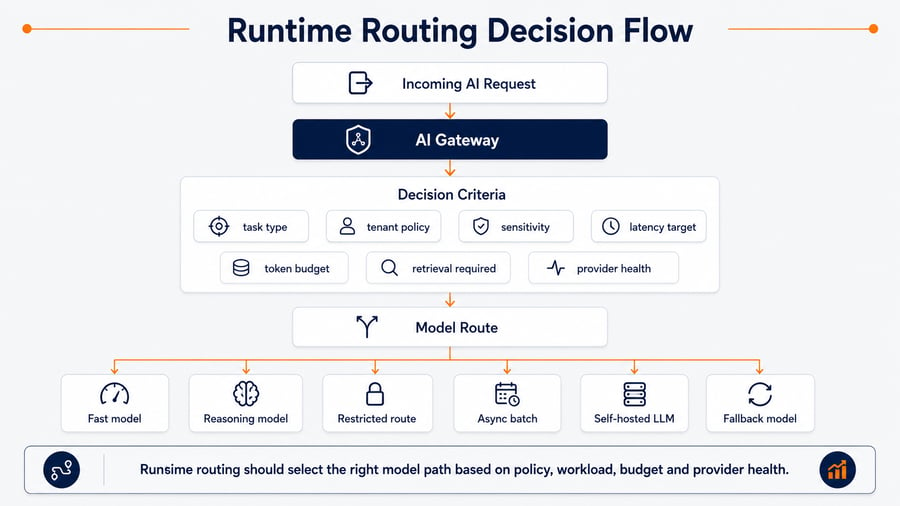
4. Runtime Routing: Model Choice Becomes Platform Logic
Without a gateway, model selection usually becomes business logic inside each application.
That creates long-term problems.
Every product team makes its own decision about which model to call, how to handle slow responses, and when to use a cheaper or more capable model.
A better pattern is to move routing into the AI gateway.
| Request type | Gateway decision | Example route |
|---|---|---|
| Simple classification | Use a lower-cost model | Fast model route |
| Complex reasoning | Use a stronger reasoning model | Claude or similar model path |
| Sensitive workflow | Apply stricter policies and logging | Restricted route |
| Large summarisation job | Move to asynchronous processing | Queue and batch route |
| High-volume repetitive task | Use an optimised self-hosted model | EKS or SageMaker route |
| Provider error or throttling | Use fallback policy | Backup model route |
This makes routing a platform concern.
Applications send a structured request. The gateway decides how to serve it based on policy, cost, latency and risk.
A typical request contract might include:
{
  "tenant_id": "tenant-123",
  "user_id": "user-456",
  "workflow": "support_summary",
  "sensitivity": "internal",
  "latency_class": "interactive",
  "budget_class": "standard",
  "retrieval_required": true,
  "trace_id": "req-789"
}
The application should not need to know every model, provider, prompt and fallback route.
It should know the business task.
The gateway should know the inference policy.
5. Governance Lives in the Gateway
AI governance becomes difficult when every application implements controls differently.
One service may redact sensitive data before inference. Another may not. One workflow may log model responses. Another may only log errors. One assistant may check document access before retrieval. Another may pass retrieved context directly into the prompt.
This is risky because governance becomes inconsistent.
The AI gateway is where runtime governance should be centralised.
For Amazon Bedrock workloads, Amazon Bedrock Guardrails can be used as part of this control layer to apply safeguards across inputs and model responses.
Typical controls include:
- tenant policy
- RBAC or ABAC rules
- document access checks
- prompt policy
- sensitive data redaction
- input validation
- response validation
- restricted routes for sensitive workflows
- audit logging
- retention rules
- approval requirements for specific use cases
For RAG workloads on AWS, Amazon Bedrock Knowledge Bases can help connect proprietary data sources to generative AI applications while keeping retrieval as a managed part of the architecture.
The gateway should not only ask:
Can this user call a model?
It should also ask:
Can this user retrieve this document, use this context, send it to this model, and receive this response?
That distinction matters.
Many AI risks do not come from the model endpoint itself. They come from the data passed into the request path.
6. Cost Control Starts Before the Model
LLM cost control is often treated as a reporting problem.
Teams look at usage after the model has already been called.
That is too late.
The AI gateway is where cost control starts before inference happens.
Controls can include:
- maximum input tokens
- maximum output tokens
- context window limits
- retrieval
top_klimits - prompt template limits
- rate limits per tenant or workflow
- model route restrictions
- budget classes
- caching rules for repeatable requests
- batch routing for non-urgent jobs
- fallback to lower-cost routes where quality allows it
| Workflow | Cost control |
|---|---|
| Support summary | Limit retrieved documents and output length |
| Internal knowledge search | Cap context size and apply query caching |
| Analytics assistant | Route complex questions to stronger models only when needed |
| Batch document processing | Use asynchronous queue and batch inference |
| Customer-facing chat | Apply strict output limits and tenant-level budgets |
The gateway should attach cost to the right unit of ownership.
Not only:
- model
- account
- region
But also:
- tenant
- workflow
- product feature
- team
- environment
- prompt version
This makes optimisation easier because cost becomes connected to product behaviour.
7. Observability Starts at the Gateway
AI observability is not only about model latency.
A production LLM request may include authentication, retrieval, filtering, prompt assembly, model invocation, validation, fallback and response formatting.
If these stages are not measured separately, debugging becomes guesswork.
The gateway should produce structured telemetry for every inference request. For Amazon Bedrock usage, model invocation logging and runtime monitoring should be considered alongside application traces, gateway logs and product-level cost attribution.
| Signal | Why it matters |
|---|---|
tenant_id |
Cost, usage and governance attribution |
workflow |
Understand which AI features drive load |
model_provider |
Compare Bedrock, self-hosted and external routes |
model_name |
Track cost and latency by model |
prompt_version |
Debug behavioural changes after prompt updates |
input_tokens |
Understand request cost drivers |
output_tokens |
Control response cost and latency |
retrieval_latency |
Separate RAG delay from model delay |
inference_latency |
Measure model and provider performance |
validation_result |
Track blocked or modified responses |
fallback_used |
Detect provider, policy or quality issues |
estimated_cost |
Attribute spend before invoice review |
trace_id |
Connect AI calls to application traces |
A simple log event might look like this:
{
  "trace_id": "req-789",
  "tenant_id": "tenant-123",
  "workflow": "support_summary",
  "model_provider": "bedrock",
  "model_route": "standard_reasoning",
  "prompt_version": "support-summary-v4",
  "input_tokens": 1800,
  "output_tokens": 420,
  "retrieval_latency_ms": 180,
  "inference_latency_ms": 1450,
  "fallback_used": false,
  "validation_result": "passed",
  "estimated_cost_usd": 0.021
}
This gives platform, product and engineering teams a shared view of how AI features behave in production.
8. AWS Reference Architecture for an AI Gateway
An AI gateway on AWS can be implemented in different ways depending on workload volume, latency requirements and operational maturity.
A practical reference architecture may look like this:
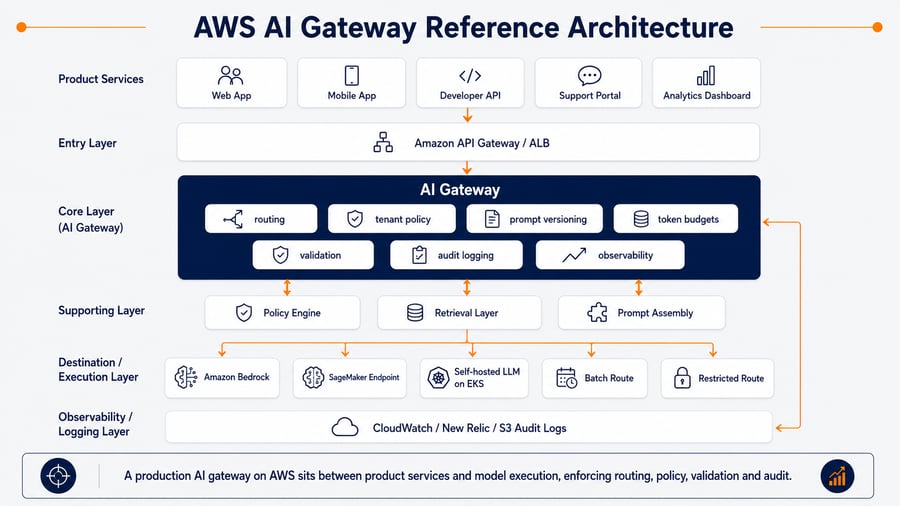
The AWS implementation can vary by architecture, but the pattern usually includes these layers:
| Layer | Example AWS services or patterns |
|---|---|
| Entry point | Amazon API Gateway, Application Load Balancer |
| Gateway runtime | Amazon ECS, Amazon EKS, AWS Lambda |
| Identity and access | IAM, Cognito, OIDC, JWT-based identity |
| Policy and config | DynamoDB, AWS AppConfig, policy engine, Git-backed config |
| Prompt management | Amazon Bedrock Prompt Management, Git-based prompt registry |
| Retrieval | Amazon OpenSearch Service, Aurora PostgreSQL with pgvector, Bedrock Knowledge Bases |
| Model providers | Amazon Bedrock, SageMaker endpoints, self-hosted models on EKS |
| Async processing | Amazon SQS, EventBridge, Step Functions |
| Observability | CloudWatch, X-Ray, OpenTelemetry, New Relic |
| Audit storage | Amazon S3, CloudWatch Logs, security data lake patterns |
This architecture does not require every AI workload to use the same model path.
That is the point.
The gateway provides a standard control layer while allowing different routes behind it.
A SaaS product may use Amazon Bedrock for most interactive features, a self-hosted model on Kubernetes for high-volume internal tasks, and an asynchronous batch path for document processing.
The gateway makes those routes consistent, observable and governed.
9. What Should Not Live in the Gateway
An AI gateway should not become a large monolith that owns every part of the AI platform.
It should not replace:
- application business logic
- model hosting infrastructure
- vector database tuning
- offline evaluation pipelines
- human review workflows
- data governance programmes
- CI/CD release processes
The gateway should focus on runtime control.
That means:
- receiving structured AI requests
- applying policy
- selecting routes
- enforcing budgets
- assembling approved prompts
- calling retrieval where needed
- invoking the selected model path
- validating responses
- producing telemetry
- recording audit events
The gateway should not become the place where every product-specific decision is hard-coded.
A strong AI gateway is configurable, observable and policy-driven.
10. AI Gateway Is a Platform Capability
An AI gateway is not the same as Amazon API Gateway.
Amazon API Gateway can be one part of the entry layer, but an AI gateway is a higher-level platform capability.
It understands AI-specific concerns such as:
- prompt versions
- token budgets
- model routing
- retrieval policy
- response validation
- model fallback
- cost attribution
- AI-specific audit trails
- tenant-aware governance
It is also not just a proxy.
A proxy forwards traffic.
An AI gateway controls how inference happens.
That distinction becomes important when AI adoption grows across multiple teams, products and environments.
Without a gateway, every new AI feature adds another model access path.
With a gateway, each new AI feature uses a shared runtime control layer.
That makes the platform easier to govern, easier to observe and easier to scale.
Where Bion Helps
As AI usage moves beyond the first prototype, teams need more than model access.
They need a production platform that can control model routing, cost, governance, retrieval, observability and operational ownership.
Bion helps teams design and implement production-ready AI platforms on AWS, including:
- AI gateway and model routing architecture
- Amazon Bedrock integration
- self-hosted LLM deployment on Kubernetes
- RAG architecture on AWS
- token and inference cost control
- AI security and governance controls
- observability for prompt-to-response workflows
- AI platform operations and MLOps foundations
If your AI product is starting to rely on multiple models, teams, workflows or data sources, the question is no longer only:
Which model should we use?
The better question is:
How do we control model access across the platform?
Related Reading
- AI Platform Architecture & Implementation
- Generative AI & LLM Deployment on AWS
- AI Platform Operations and MLOps on AWS
- How to Build Production-Ready LLM Deployments on AWS
- Amazon Bedrock vs Self-Hosted LLMs: What Changes in Production
- How to Reduce LLM Inference Costs on AWS
- AI Security and Governance on AWS: How to Control LLMs in Production